Startup Modes
The server binary supports several startup modes via --startup-mode (or -s). The configuration file path can be set with -c.
cargo run -- --startup-mode <MODE>
cargo run -- --help
Available Modes
| Mode | Role |
|---|---|
default | Full mode — runs Signaling + Desk Server + WebRTC + Capture in a single process. |
signaling | Signaling service only (Signaling + TURN). |
desk-server | Desk server only (controlled device). |
service-daemon | System service daemon (SYSTEM / root) that manages per-session workers. |
session-worker | Worker process launched by the daemon inside the user's desktop session. |
mcp-stdio | Read-only MCP server over stdio for local AI assistants. |
Default Mode
The simplest deployment: the same logical daemon → peer connection → worker pipeline runs inside one OS process and uses in-process channels. It is ideal for portable use and development.
Service-Daemon Process Model
To capture secure environments like the Windows UAC or lock screen, the service-daemon mode splits operations across privilege boundaries:
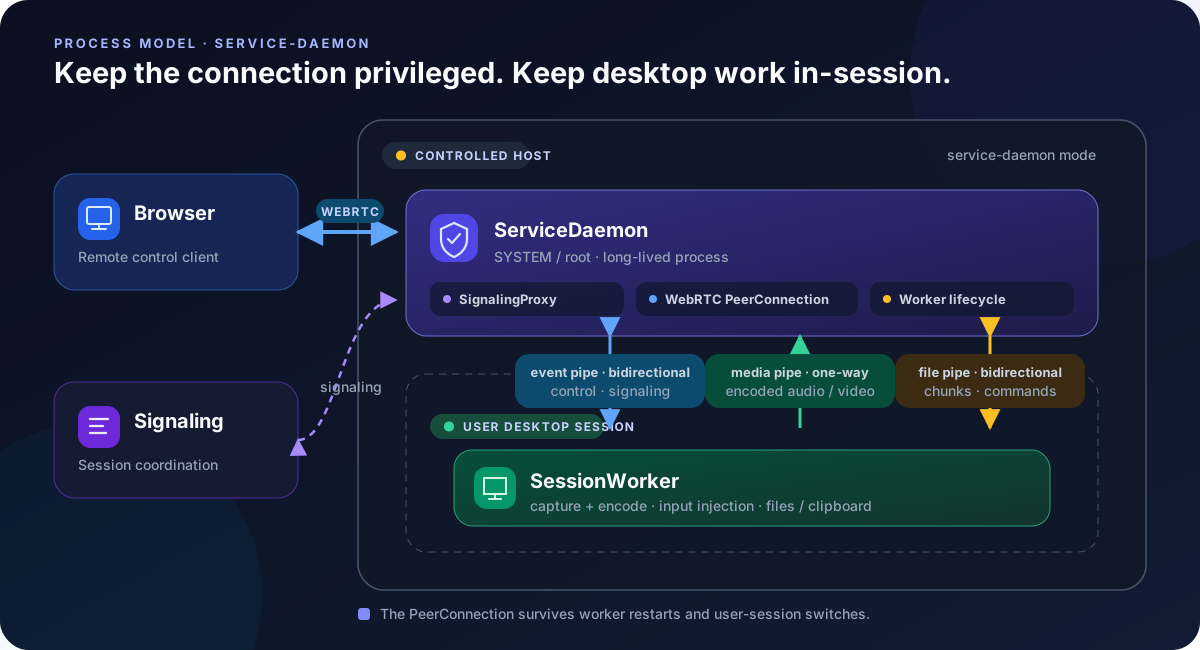
The ServiceDaemon (running as SYSTEM / root) owns the WebRTC connection, signaling, and child processes. It spawns a SessionWorker inside each desktop session for capture, encoding, input, files, and clipboard.
They use three independent transports: a bidirectional event pipe for signaling and control, a one-way media pipe for encoded audio/video frames, and a bidirectional file pipe for file commands and chunks. Keeping file transfer separate prevents its backpressure from blocking control events.
This split lets session workers restart during user switching without dropping the browser connection — the peer connection lives in the daemon.
Native system-service integration is currently implemented on Windows. On Linux and macOS, service-daemon currently runs interactively while retaining the same logical process model.
MCP stdio Mode
--startup-mode mcp-stdio turns the device into a read-only MCP server. In this mode stdin/stdout carry MCP JSON-RPC, so the server must never log to stdout.